Most people experimenting with AI coding agents are searching for the “ultimate setup”: the perfect combination of slash commands, AGENTS.md files, skills, plugins, MCP servers, and prompts that can help build almost anything.
But after several months working with tools like Claude Code, we started to feel that this pursuit of a universal workflow was not always the most effective path.
Instead, we began to see better results when designing workflows for very specific kinds of development work.
Not “build software in general”, but narrower categories of tasks with a recognizable structure: implementing repetitive UI sections, migrating patterns across a codebase, applying the same architectural change multiple times, or validating visual consistency across pages.
This article is the story of one of those workflows: implementing our new company website (this website!) from a Figma design using Claude Code.
The initial experience: manual from the start
From the beginning, the project looked like a strong candidate for AI-assisted development. We already had a complete Figma design system, desktop and mobile layouts, clearly separated sections, and a frontend stack built around Astro and Tailwind. Using Claude Code together with the Figma MCP and a set of custom skills, we could generate solid HTML and Tailwind directly from the designs.
But there was never really a “magic” moment where we believed the implementation would become mostly automatic. Very early on, it became obvious that even using the most powerful Claude model available, with MCP integrations and structured prompts, we would still need extensive manual testing and tuning. The generated code was often close, but not visually accurate or consistent enough to trust without careful verification.
Most of the effort quickly shifted toward validating browser behavior, correcting visual inconsistencies, refining spacing and responsiveness, and repeatedly reinforcing project conventions. The biggest issue we noticed was not raw coding capability, but the lack of precision and consistency in the final UI output. The workflow still depended heavily on manual feedback loops and iterative correction to reach production-quality results.
From prompt engineering to workflow engineering
One of the key ideas that emerged during the project was:
prompt engineering < context engineering < feedback loop engineering
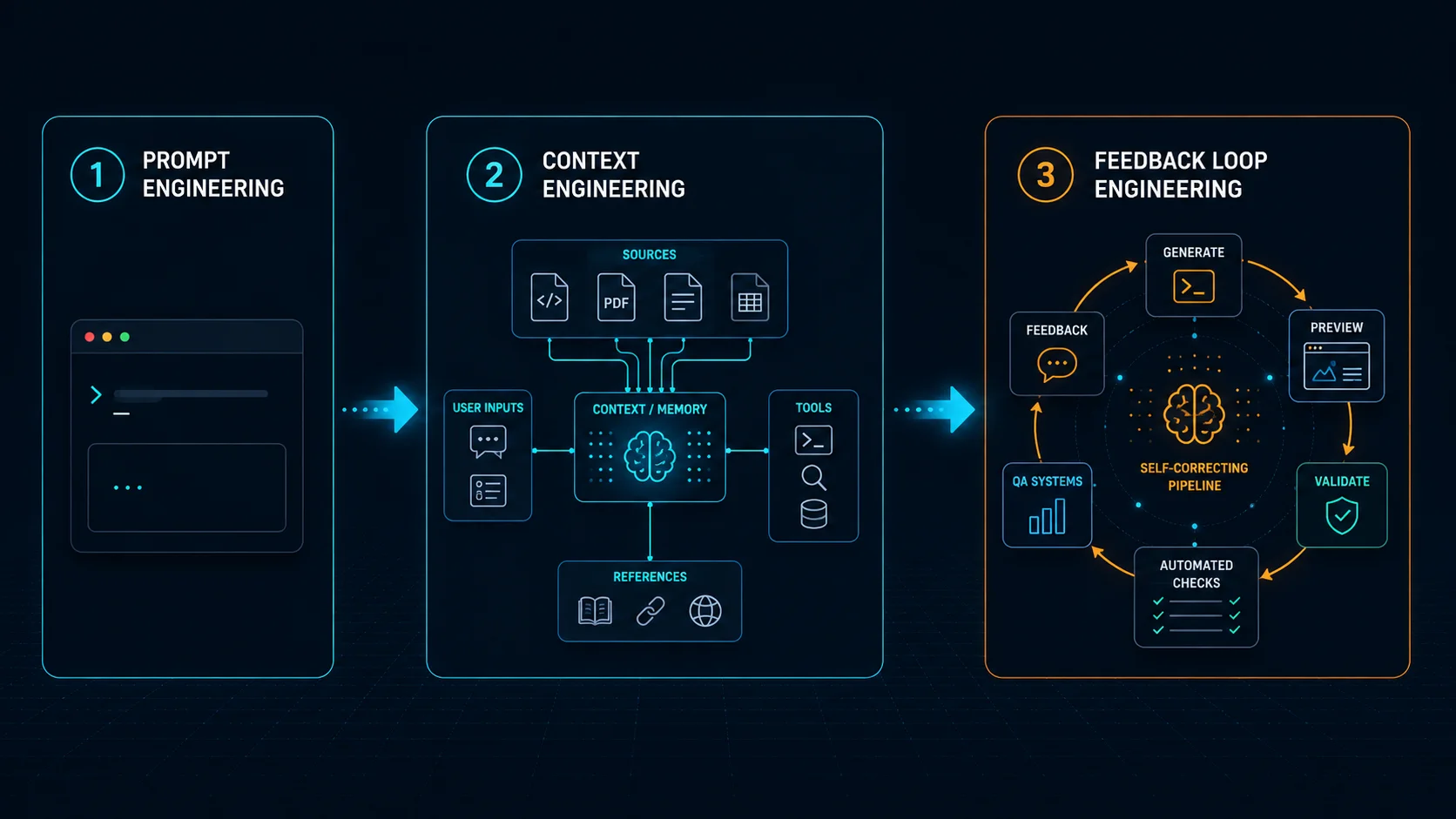
Better prompts help, and better context helps even more. But what really improved reliability was building workflows where agents could repeatedly verify their own work in context.
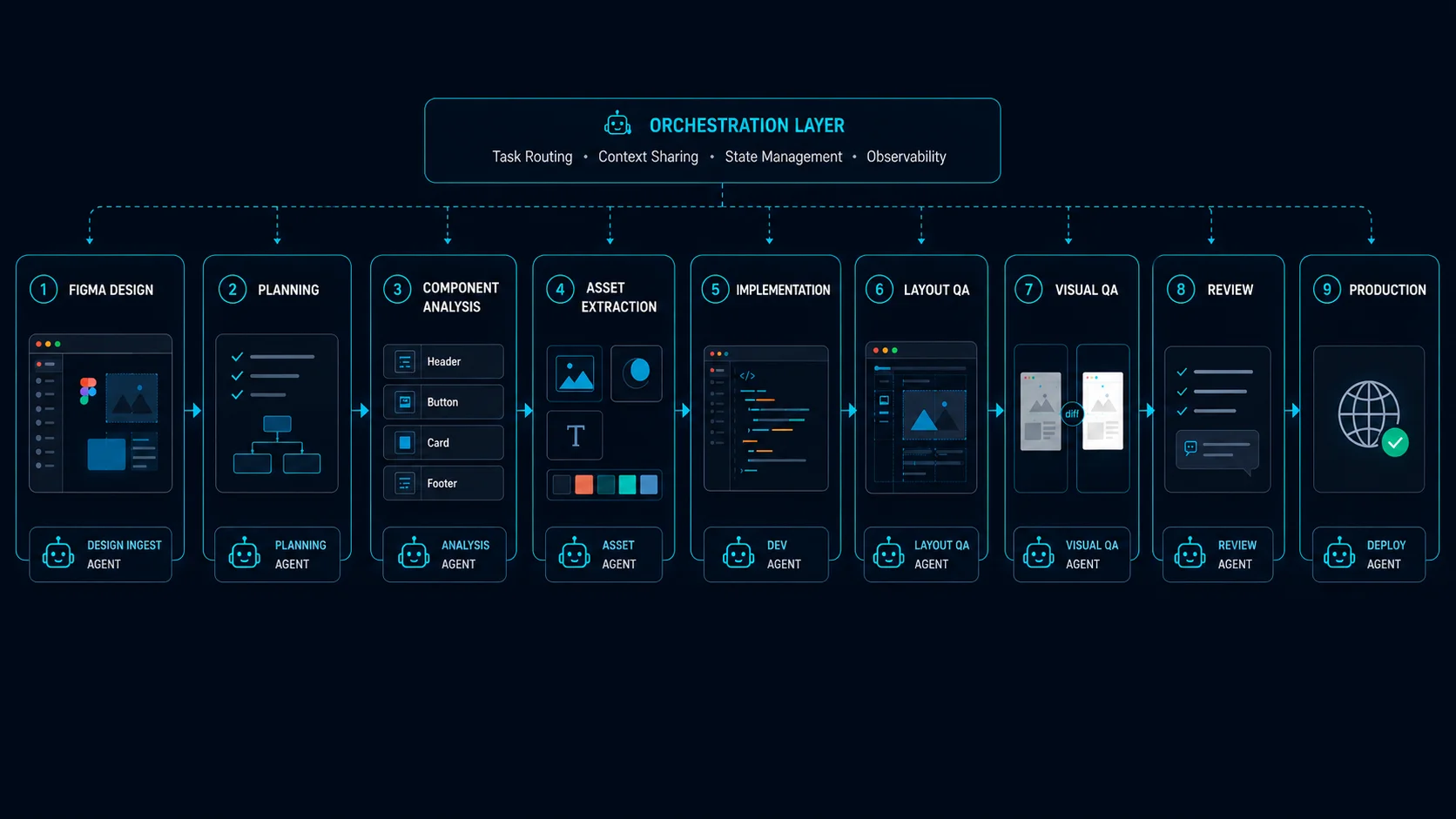
Instead of simply asking an agent to “implement this section”, we started designing explicit pipelines around the task itself. Every page section moved through the same sequence: planning, component analysis, asset extraction, implementation, validation, visual QA, and finally review.
At some point, the prompts stopped looking like prompts and started resembling engineering documentation. That shift turned out to matter a lot.
The workflow
Eventually we realized we were no longer trying to optimize prompts in isolation. We were designing a repeatable system with specialized responsibilities, validation stages, and explicit iteration loops.
In practice, the workflow itself was orchestrated through a small set of slash commands like /plan-page, /implement-section, and /qa-section.
The full set of slash commands and agents we describe in this article is published at github.com/wyeworks/figma-to-astro-pipeline for readers who want to study the actual prompts.
The human stayed mostly at the strategic level while the agents handled the repetitive mechanical work.
Planning before implementation
One of the most important steps was planning before any code generation happened.
The /plan-page command analyzed the Figma page and generated a structured implementation plan. It identified sections, detected reusable components, determined which assets were required, and even suggested whether certain pieces should be implemented as Astro or React components.
This mattered because we wanted agents to think structurally before writing code. Claude Code does ship with a built-in plan mode that is widely recommended, and it’s a great default. But for this kind of repetitive, design-driven work, we preferred to define our own planning phase, explicitly tailored to our case. Without that level of structure, implementations tended to become inconsistent very quickly.
Specialized agents instead of a “master agent”
One interesting consequence of this approach was that we stopped trying to build one giant all-knowing agent.
Instead, we built several narrow agents with highly opinionated responsibilities.
For example, the asset-extractor agent focused exclusively on downloading assets from Figma, converting formats, cleaning SVGs, and generating stable local paths. The section-implementer specialized in Astro and Tailwind implementation, design token translation, accessibility rules, and component conventions.
We also created validators with very narrow scopes. The astro-validator handled Astro-specific concerns like hydration directives, frontmatter rules, invalid React usage, and build verification. Meanwhile, the css-compat-validator focused on browser compatibility issues that are easy to overlook, especially Safari animation quirks, unsupported CSS features, and problematic SVG behavior.
Breaking responsibilities apart this way produced much more reliable behavior than trying to create a single “super agent” that understood everything.
Dual QA: deterministic and visual
Probably the most interesting part of the workflow was the QA pipeline.
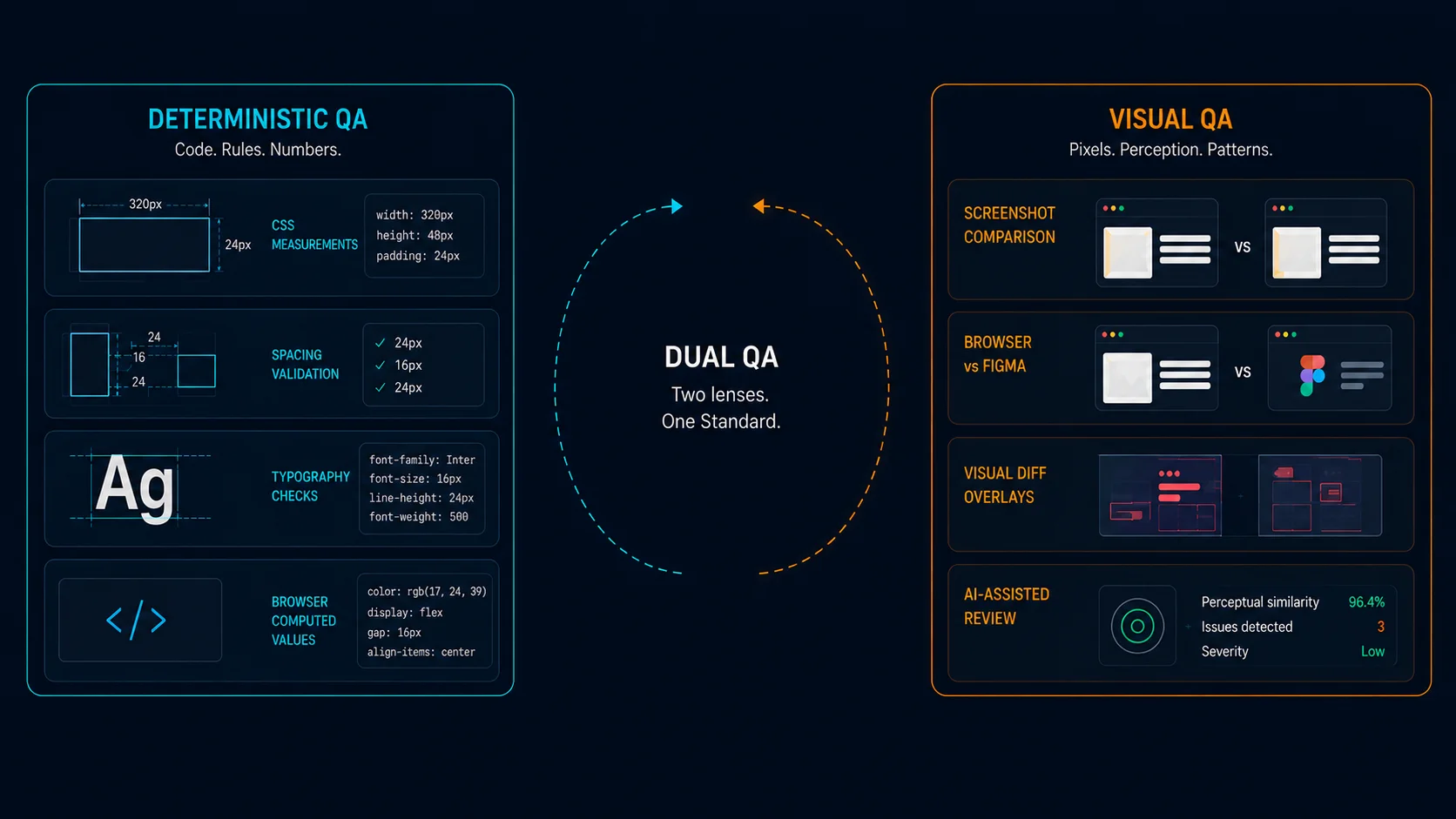
We eventually realized that frontend validation required two fundamentally different kinds of verification.
Deterministic QA
One agent extracted exact measurements from Figma and compared them against browser-computed CSS values. It validated spacing, typography, dimensions, gaps, border radius values, and alignment directly against the source design.
To make this work reliably, we relied heavily on browser MCP integrations. Most of the validation was executed through Playwright MCP and Chrome DevTools MCP sessions, which allowed agents to inspect live DOM nodes, query computed styles, capture layout metrics, and execute JavaScript directly inside the browser context.
The key idea was simple:
- extract measurements from Figma
- locate the equivalent DOM element
- compute the actual rendered values
- compare both with configurable tolerances
For example, agents could run small browser-side utilities like this:
function getElementMetrics(selector) {
  const el = document.querySelector(selector);

  if (!el) return null;

  const rect = el.getBoundingClientRect();
  const styles = window.getComputedStyle(el);

  return {
    width: rect.width,
    height: rect.height,
    paddingTop: styles.paddingTop,
    paddingBottom: styles.paddingBottom,
    marginTop: styles.marginTop,
    marginBottom: styles.marginBottom,
    fontSize: styles.fontSize,
    lineHeight: styles.lineHeight,
    borderRadius: styles.borderRadius,
    gap: styles.gap,
  };
}
The agent would then compare those values against the Figma design tokens or extracted measurements:
{
  "expected": {
    "fontSize": "48px",
    "lineHeight": "56px",
    "gap": "24px"
  },
  "actual": {
    "fontSize": "46px",
    "lineHeight": "56px",
    "gap": "20px"
  }
}
This transformed part of frontend QA from subjective visual review into measurable validation. Instead of asking “does this look approximately correct?”, we could ask “why is this section rendering with an 8px spacing deviation?” That shift made the workflow dramatically more reliable.
Visual QA
Another agent handled screenshot comparison and perceptual review.
This layer relied mostly on Playwright MCP browser automation together with ImageMagick-based diffing pipelines. The workflow looked roughly like this:
- render the implemented page locally
- capture screenshots at multiple breakpoints
- simulate interactions like hover and focus states
- compare screenshots against reference captures
- generate visual diff overlays
For example, agents could automatically execute flows such as:
await page.hover("[data-cta-button]");
await page.screenshot({ path: "hover-state.png" });
The resulting screenshots were then processed with ImageMagick:
compare baseline.png current.png diff.pngThis was especially useful for catching issues that deterministic QA could not easily detect:
- subtle alignment drift
- incorrect visual hierarchy
- shadow inconsistencies
- animation glitches
- responsive layout regressions
- perceptual imbalance between sections
We also experimented with LLM-based visual assessment, where models reviewed screenshots and described inconsistencies in natural language. Surprisingly, this worked reasonably well for identifying “something feels off” situations that are difficult to encode as strict rules.
The deterministic QA caught structural problems, while the visual QA caught perceptual issues, and the combination worked significantly better than either one alone.
Caveats and lessons from real-world usage
The workflow worked surprisingly well. We implemented large portions of the site much faster than expected while maintaining good consistency and quality. At times, we even had up to three parallel local Claude Code sessions working simultaneously on different sections of the site, which significantly increased throughput without requiring constant manual coordination.
But it was not frictionless. Visual bugs still happened, AI-generated UI sometimes contained strange inconsistencies, and reviewing generated frontend code for hours became mentally exhausting. We also did not manually review every line of generated frontend code. In practice, we reviewed representative parts of the implementation and relied on automated and manual audits and validation workflows to maintain consistency across the codebase.
We also hit limits with our “break everything into parts” strategy. Some layout issues only appeared once full pages were assembled, which meant we still needed manual adjustments for spacing and visual rhythm.
By the end, it was clear the workflow could be improved with better coordination and feedback loops. But since the system was highly tailored to this project, further automation no longer felt worth the effort.
One unexpected effect was that after long review sessions, we became worse at spotting small visual issues ourselves. The workflow reduced implementation effort, but human attention and verification still became the bottleneck.
In practice, about 90% of the website was implemented extremely quickly. The remaining 10% took much longer because achieving a polished result required slower validation, accessibility checks, edge-case handling, and cross-browser refinement.
For other repetitive engineering work, we built custom agents
We also realized that this approach worked especially well for long-running engineering tasks with a predictable structure. Beyond implementing the website itself, we used similar workflows for adding internationalization across the entire codebase and for porting blog posts from the legacy website into the new platform. Those efforts involved hundreds of small but consistent transformations, making them a much better fit for specialized pipelines than for ad hoc prompting.
Final thoughts
The most important lesson from this project was that coding agents become much more reliable when surrounded by specialized workflows and strong feedback systems. The breakthrough was not “better prompts”, but decomposition, validation, iteration, measurable QA, and explicit workflows designed around a specific category of work.
More than anything else, we found that building strong and reliable feedback loops was the key to making these systems actually usable in practice. In our case, the deterministic QA pipeline was a real game-changer. Once we could automatically compare implementation details against exact values extracted from Figma, a large part of frontend validation stopped being subjective review and became something measurable and repeatable. That dramatically increased consistency and reduced the amount of manual correction required.
Once we stopped treating the agent as a general-purpose assistant and started treating the workflow itself as the product, the results became significantly more consistent.
In many ways, these systems started feeling less like “AI assistants” and more like small software factories optimized for one narrow task. And I suspect that designing those factories, combining agents, tooling, validation, and feedback loops into repeatable systems, will become an important engineering skill over the next few years.